Arpan Mandal

Software Engineer · India

I build fast, accessible web apps and the tooling around them.

Skills and measured impact: what I can do, shown through what I shipped.
I build tools that people can open and use straight away, and I care how they feel.
No pill yet, so this is just me: the music, the chess and the games behind the code.

Take a pill. Red shows my skills and the impact I measured. Blue shows the products, the design and who they help.

Or just scroll and meet me. Skip ahead

A portrait of Arpan Mandal in a black suit and long black coat, holding out a red pill and a blue pill

Take the red pill and I'll show you how deep the engineering goes: the architecture, the trade-offs and the numbers behind each build.

Take the blue pill and I'll keep it on the surface: the products, the design and the people they help.

Skip the pills and just meet me: the music, the chess and the games behind the code.

The person behind it

No pill, so you get me: the music on repeat, the chess I can't stop watching and the games I keep going back to.

  • Music

    I play the flute, and listen to old songs, new songs and a lot of soundtracks.

    • Bollywood, old and new
    • Bengali music
    • Game soundtracks
    • Phonk
  • Chess

    I'd rather watch a sacrifice than a draw.

    • Attacking chess over safe chess
    • Gambits, sacrifices and brilliant moves
  • Games

    Worlds with a story, and systems that surprise.

    • Genshin Impact, for the lore
    • Simulation games and evolution sims
  • AI and LLMs

    The tools I build with are also what I read about for fun.

    • Running models locally
    • LLM tooling and coding agents

Also me Animated films, cartoons I grew up with, festivals back home, cat memes and DIY builds.

About

Name
Arpan Mandal
Role
Software Engineer
Location
India
Focus
I build fast, accessible web apps and the tooling around them.
Stack
TypeScript, JavaScript, Python, SQL, React, Next.js, Tailwind CSS, Motion
Shipping since
May 2022

I work across the stack with TypeScript, React and Node.js, and I care about performance, accessibility and clean developer tooling.

Outside of work I build small tools that automate my own workflow.

Rough ideas,

reliable products.

I am Arpan Mandal, a software engineer who enjoys turning rough ideas into reliable, well-tested products. I care how the things I build feel to the people who open them.

Projects

Shrink, convert or clean up photos without uploading them.

  • Compress
  • HEIC to JPG
  • Remove EXIF
Smaller offline install after the precache trim
about 27x

0Bytes uploaded while compressing a photo
Open Nopload

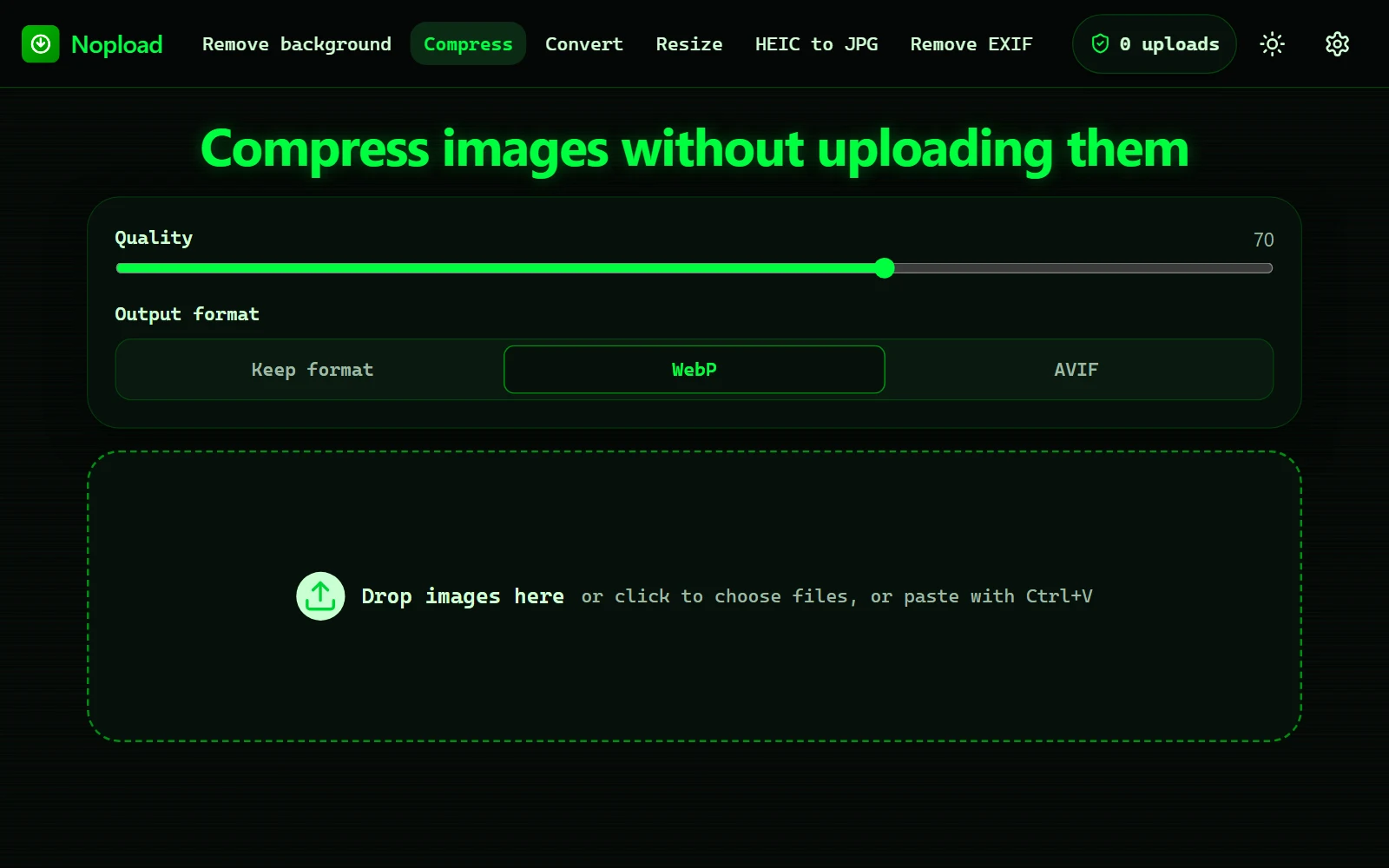
Compress settings set to WebP at quality 70, ready for photos
01 Pick settings
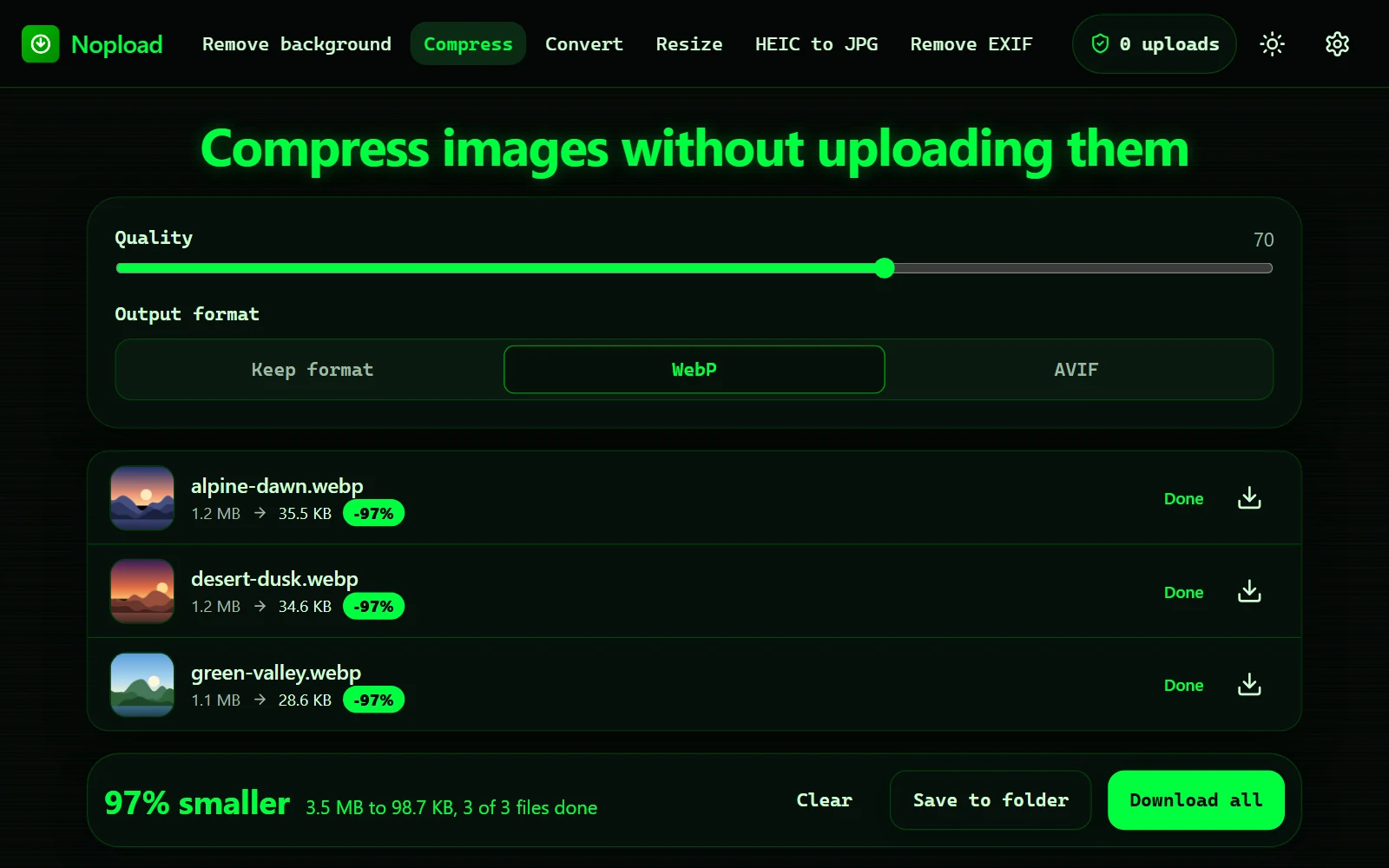
Three photos compressed to WebP, 97% smaller in total
02 See the savings
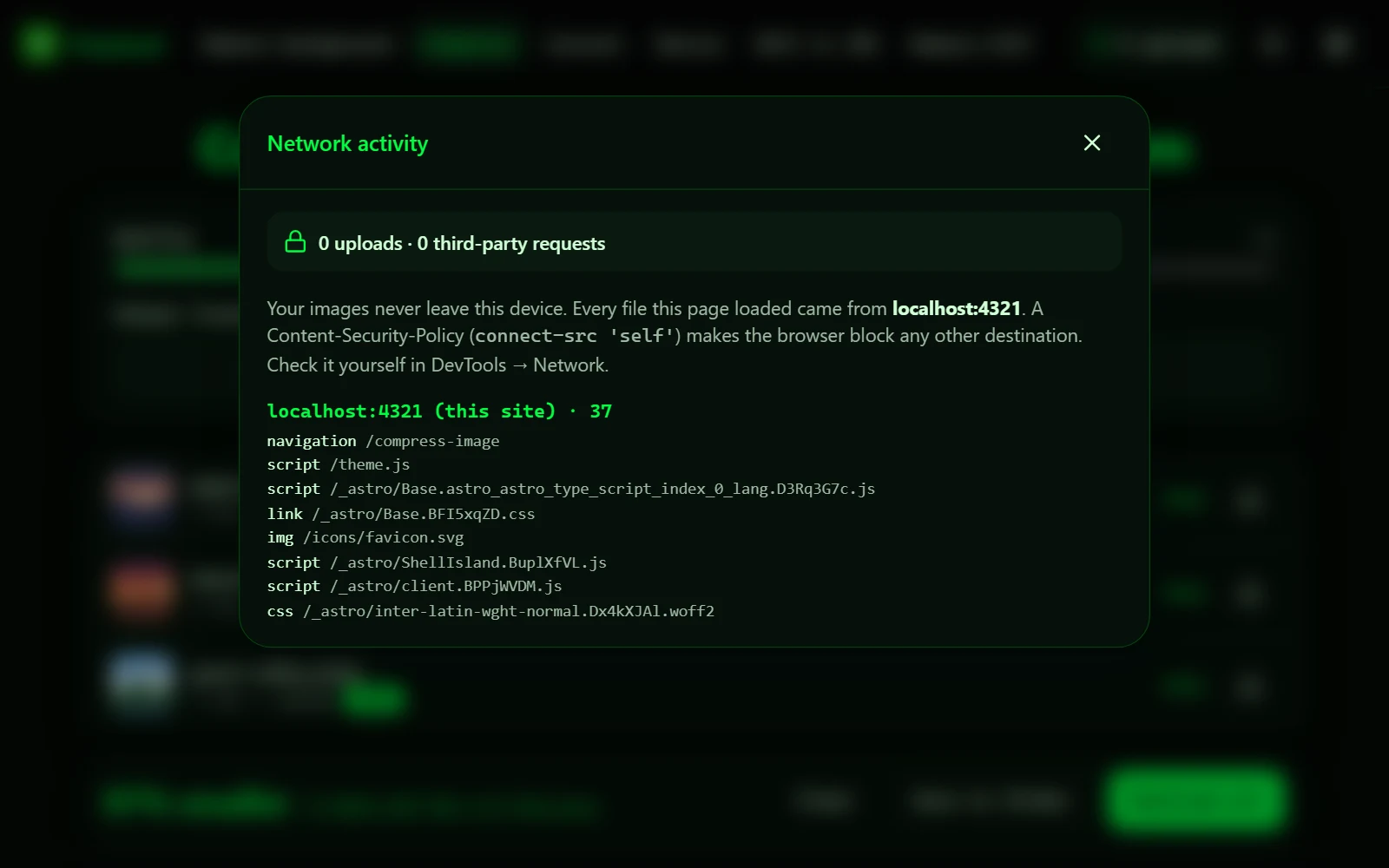
Network activity panel showing 0 uploads and 0 third-party requests
03 Check no uploads

Make QR codes that never expire, and check the ones you get.

  • WiFi and vCard
  • SVG and PDF
  • Expiry checker
Decode a QR, give its expiry verdict
about 250 ms

8QR code types, from links to WiFi

Open ForeverQR

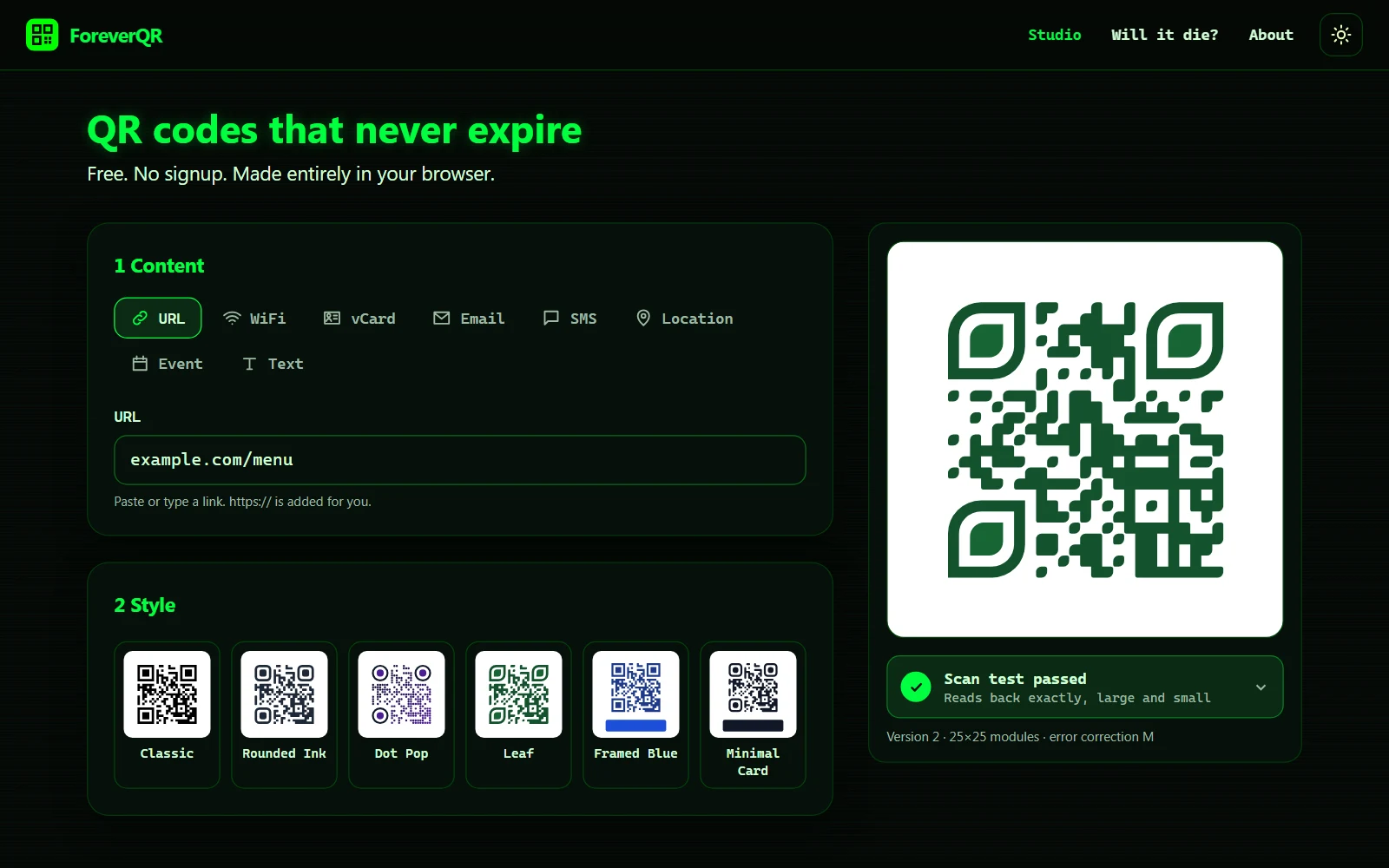
QR studio encoding example.com/menu with the Leaf style, scan test passed
01 Make the code
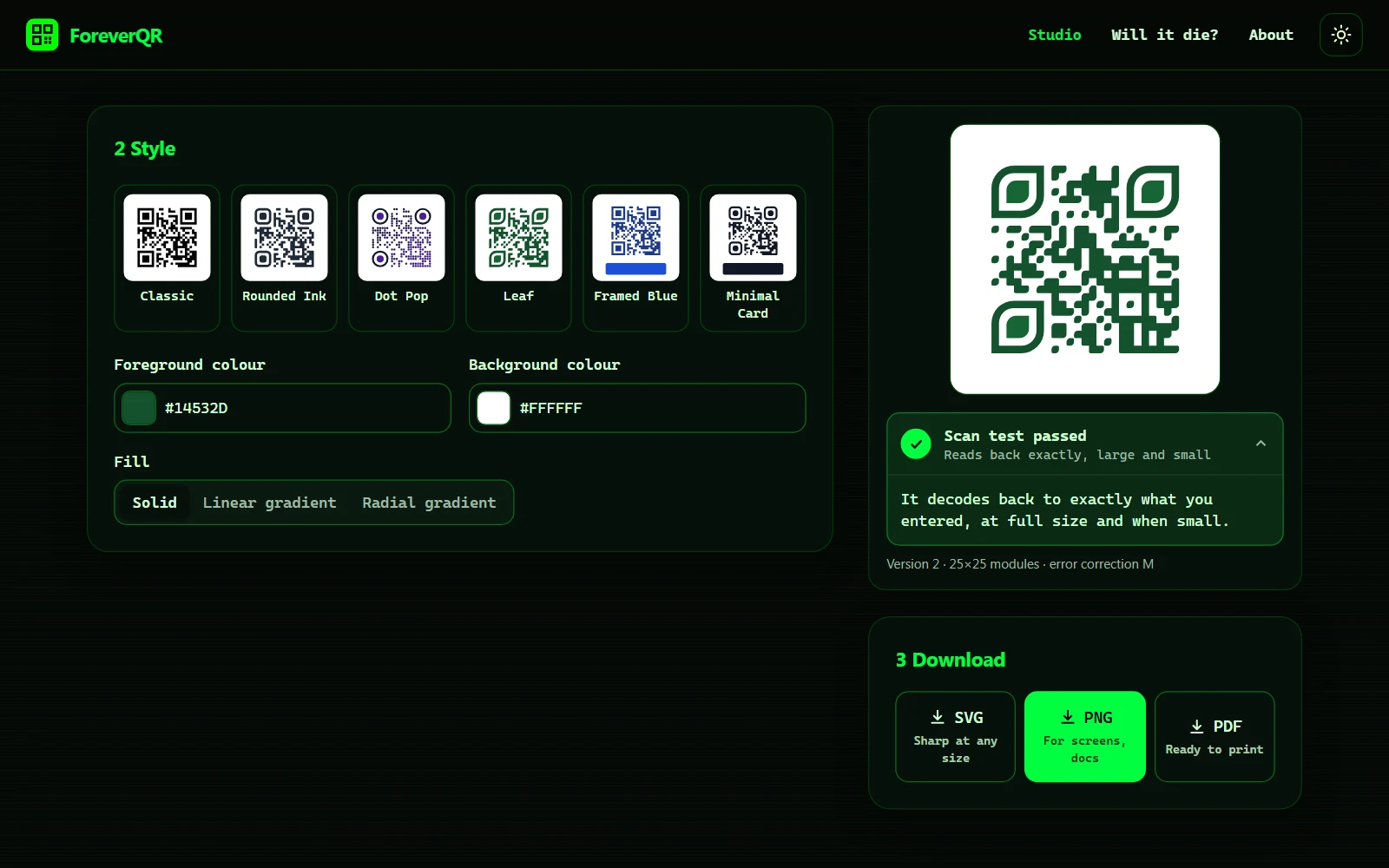
Style controls beside the scan check and the SVG, PNG and PDF downloads
02 Style and export
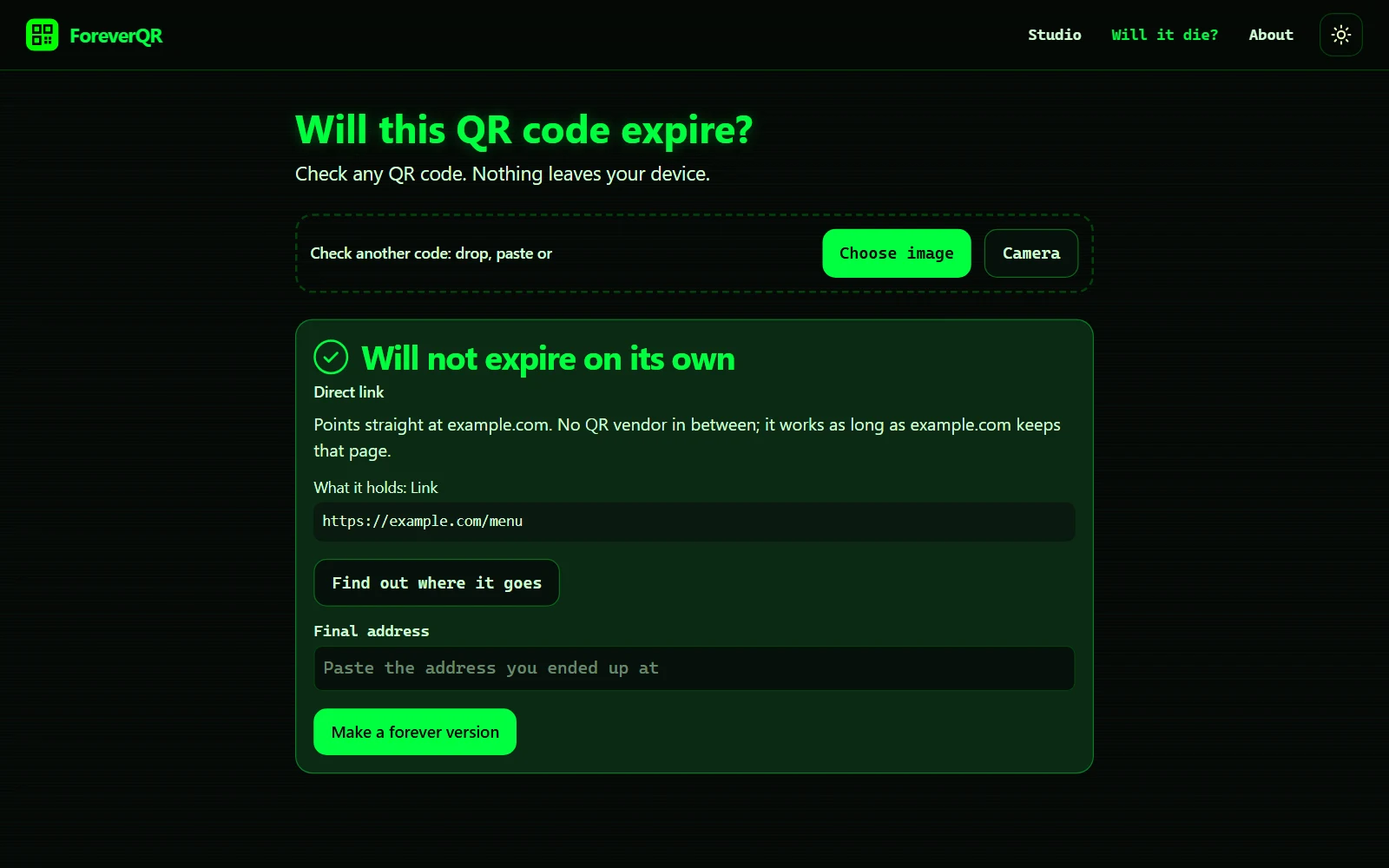
Expiry checker reading the exported PNG: will not expire on its own
03 Check it lasts

Merge, split and sign PDFs without uploading them.

  • Merge and split
  • Sign
  • True redaction
Merge 10 PDFs, 2,000 pages
2.45 s

19PDF tools, all in your browser

Open QuietPDF

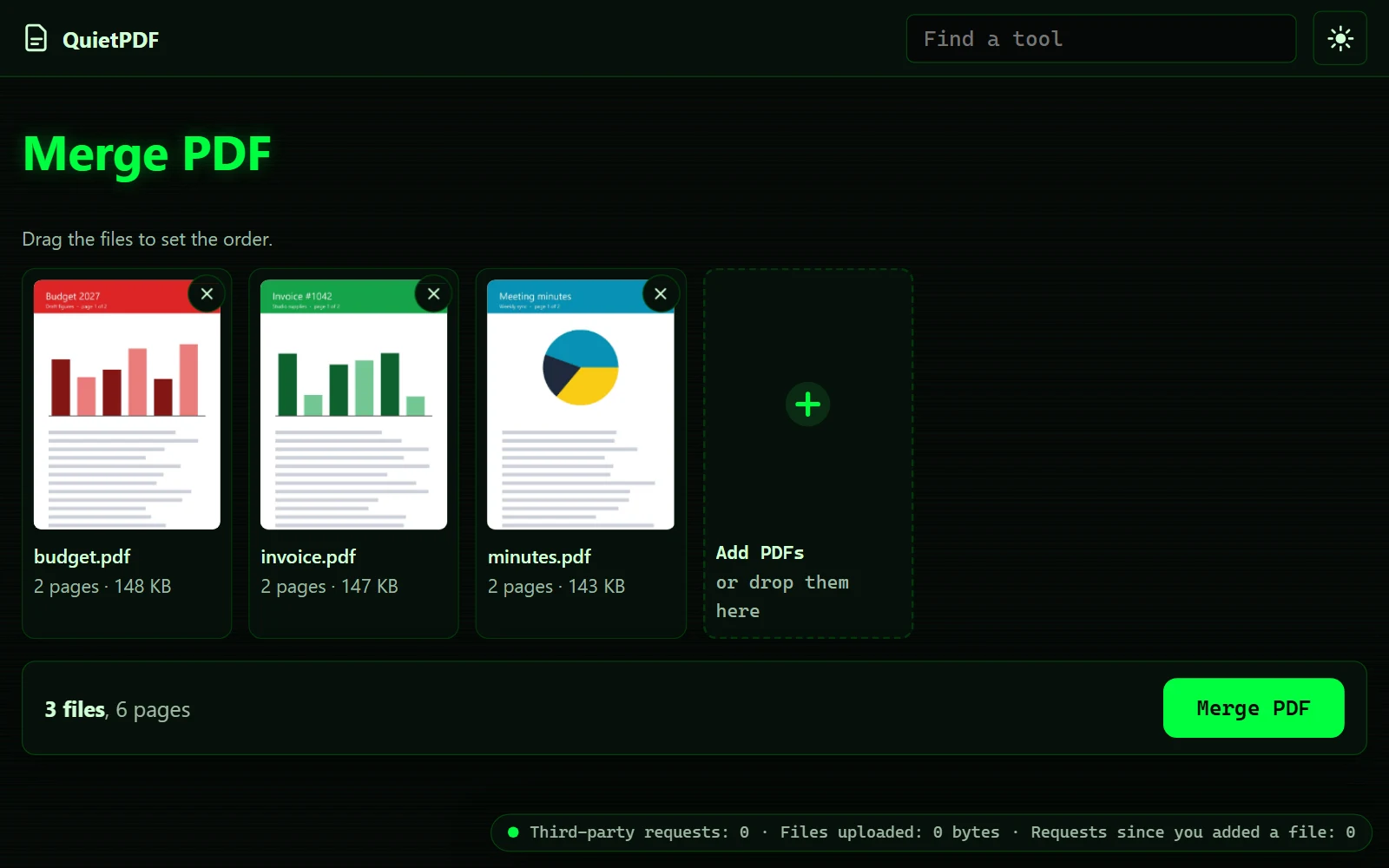
Three PDFs queued for merging, 3 files and 6 pages
01 Add the PDFs
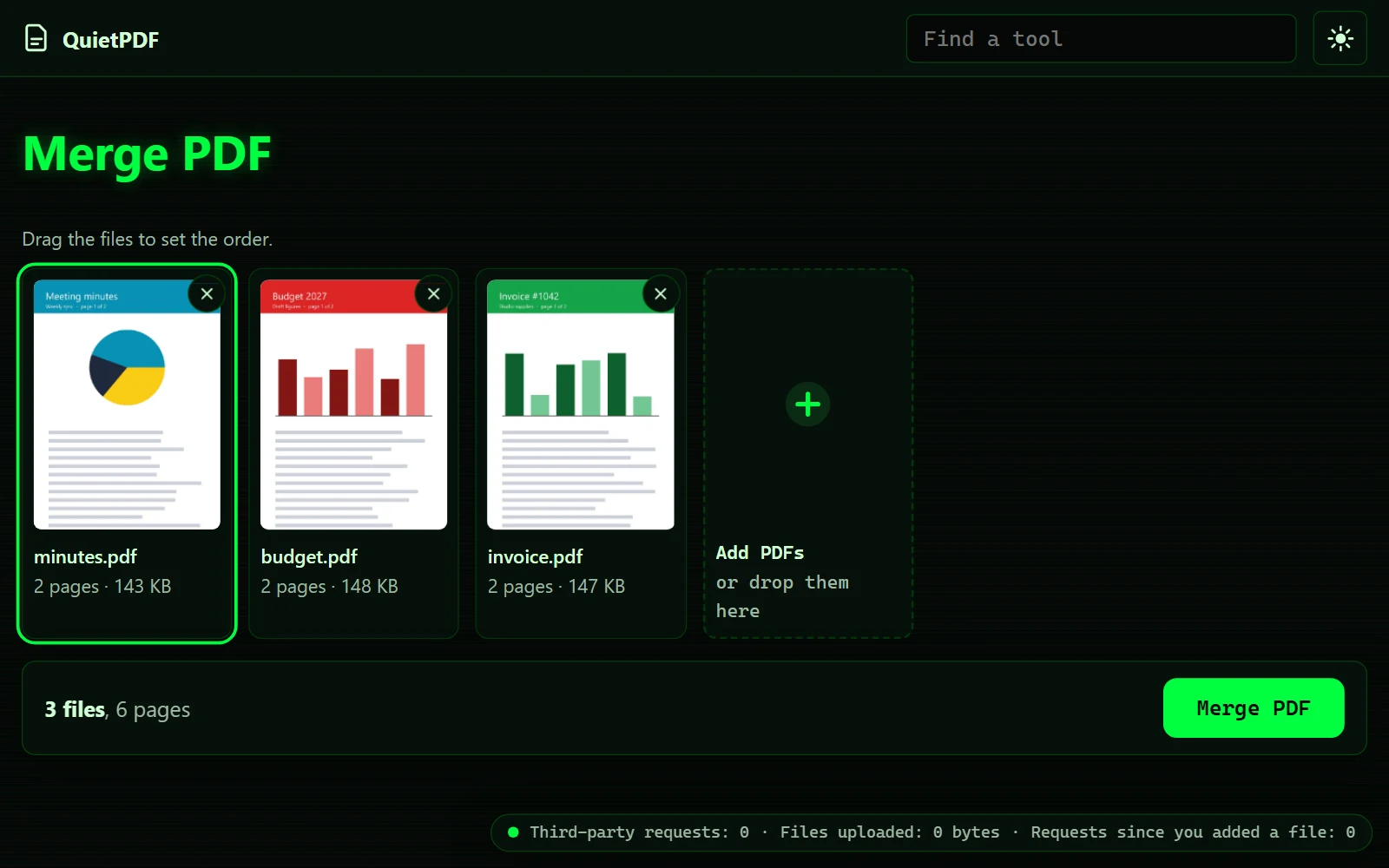
Meeting minutes moved to the front of the merge order
02 Set the order
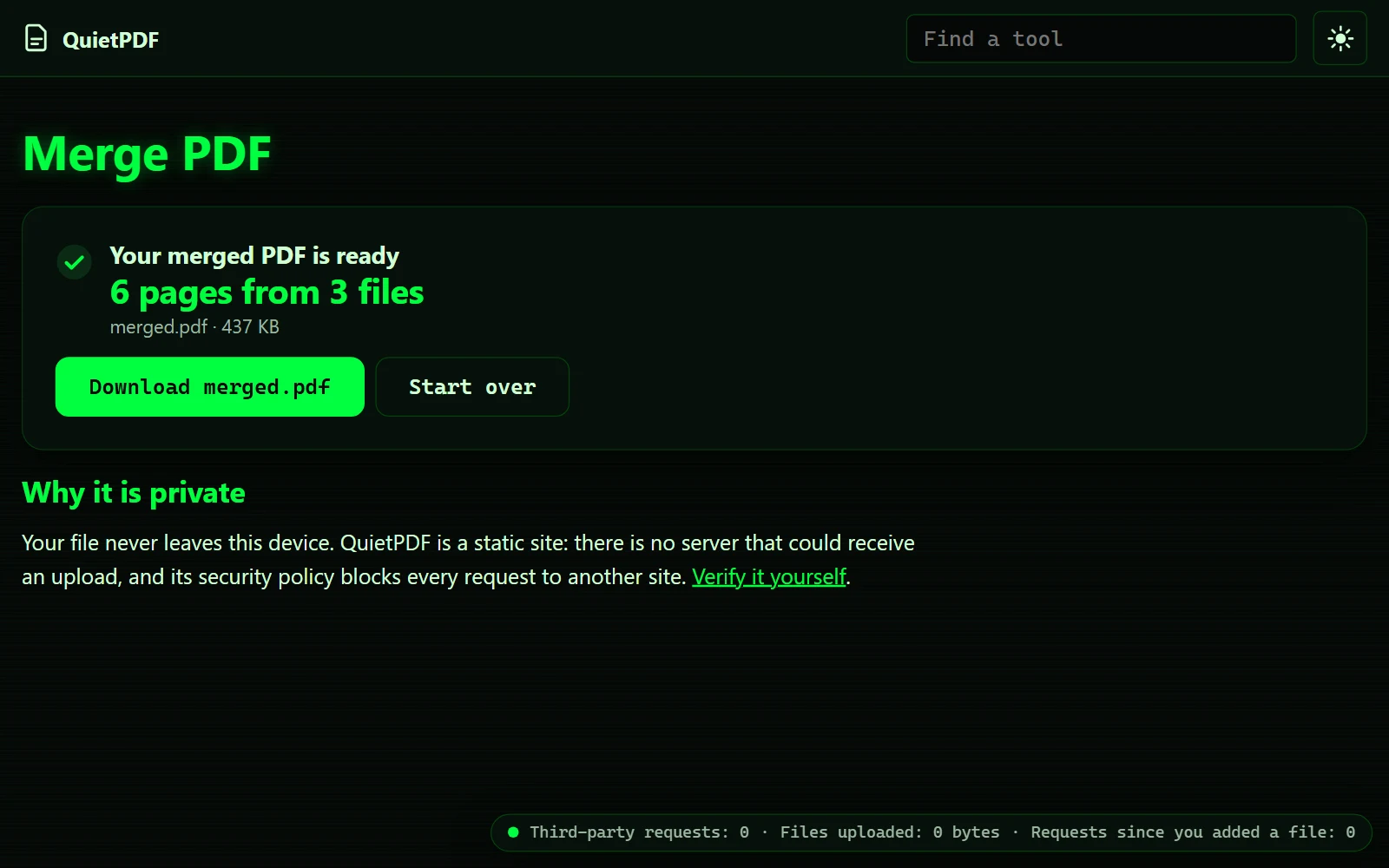
Merged PDF ready: 6 pages from 3 files, 437 KB
03 Download the merge

Compress, trim and convert video without uploading it.

  • Compress
  • Trim
  • Extract audio
Smaller video from a 30 s 1080p clip
76%

17Video and audio tools

Open Framelab

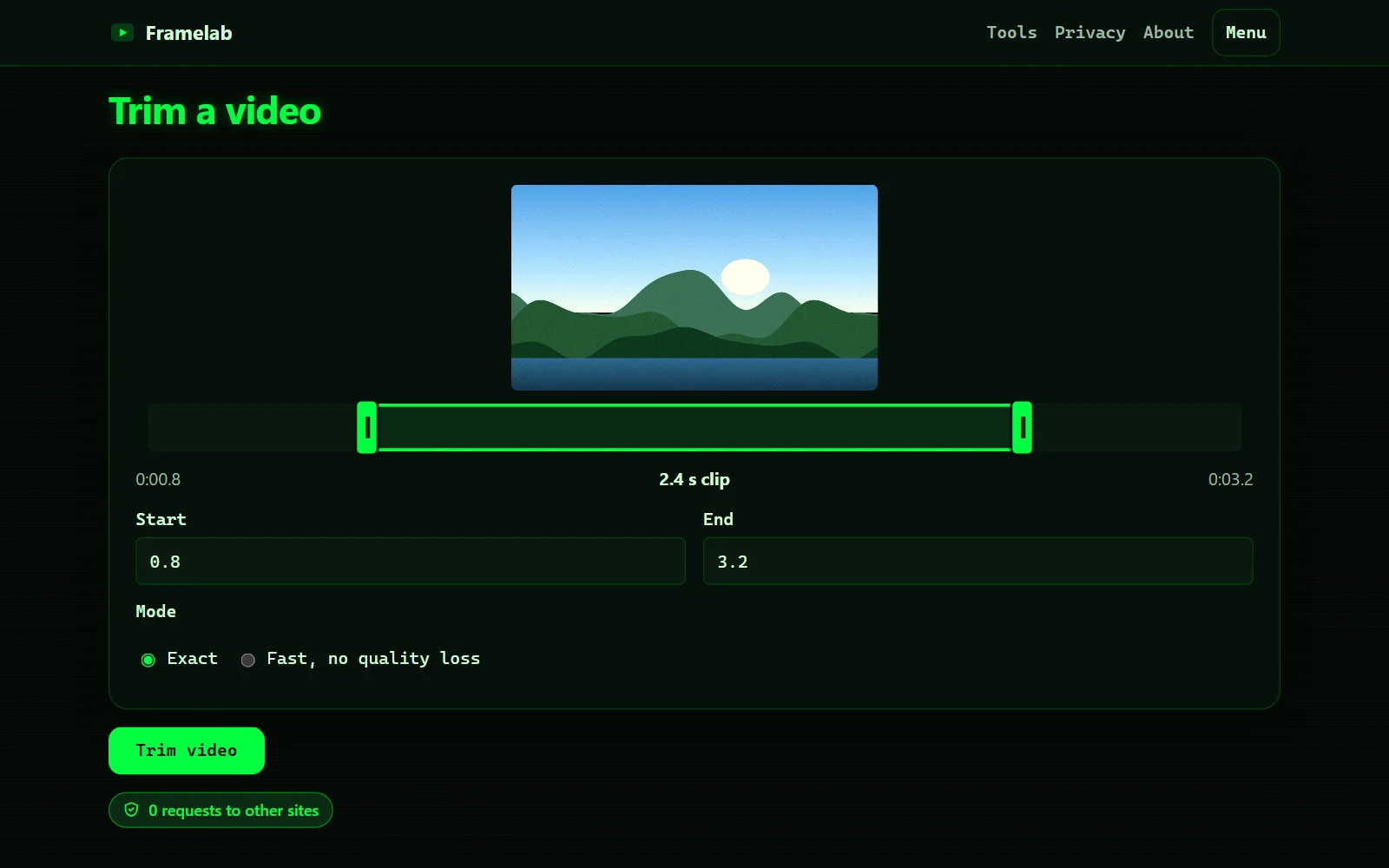
Trim timeline cutting a 2.4 second clip from 0.8 s to 3.2 s
01 Trim the clip
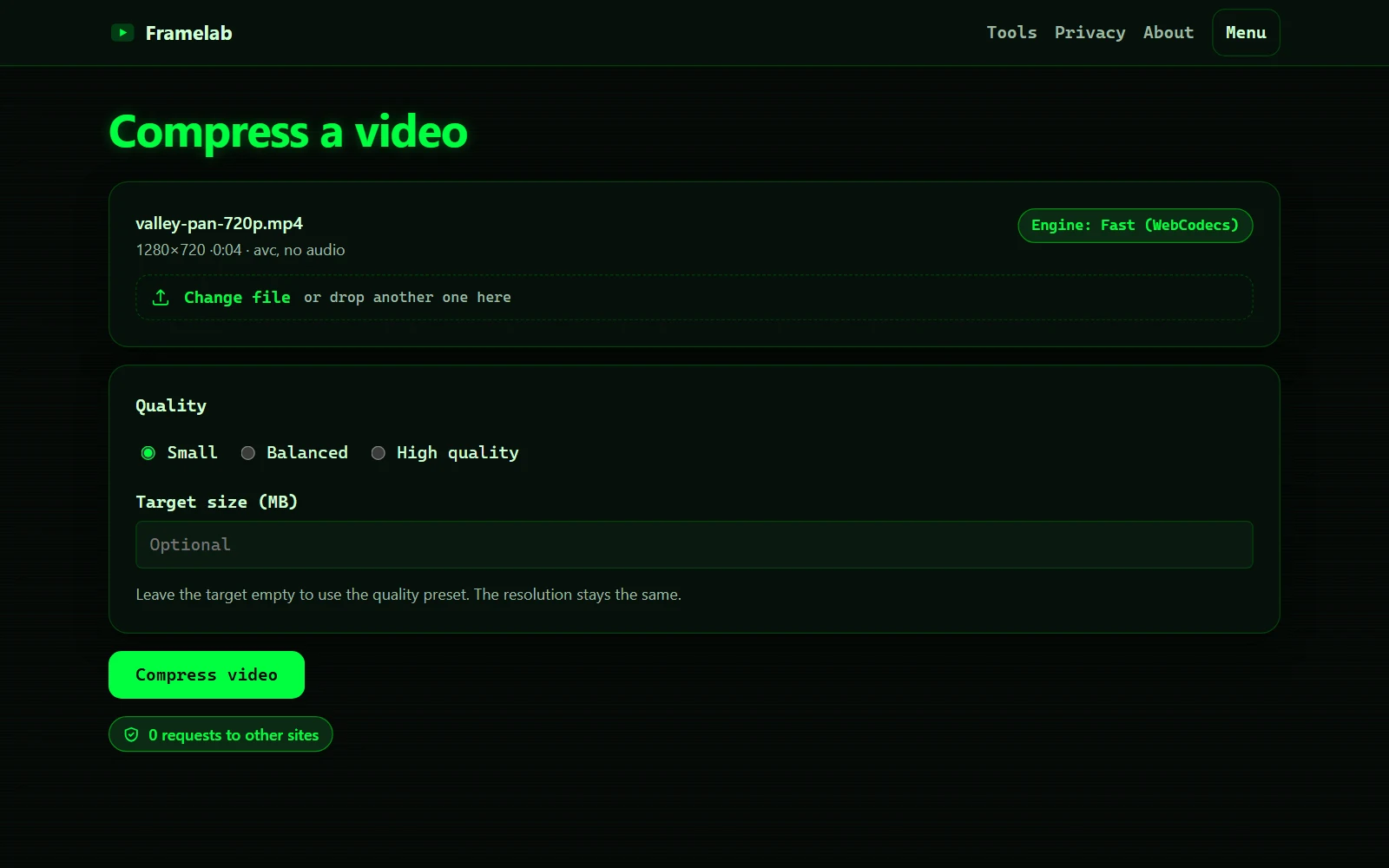
Compress video form with the Small quality preset chosen
02 Pick a size
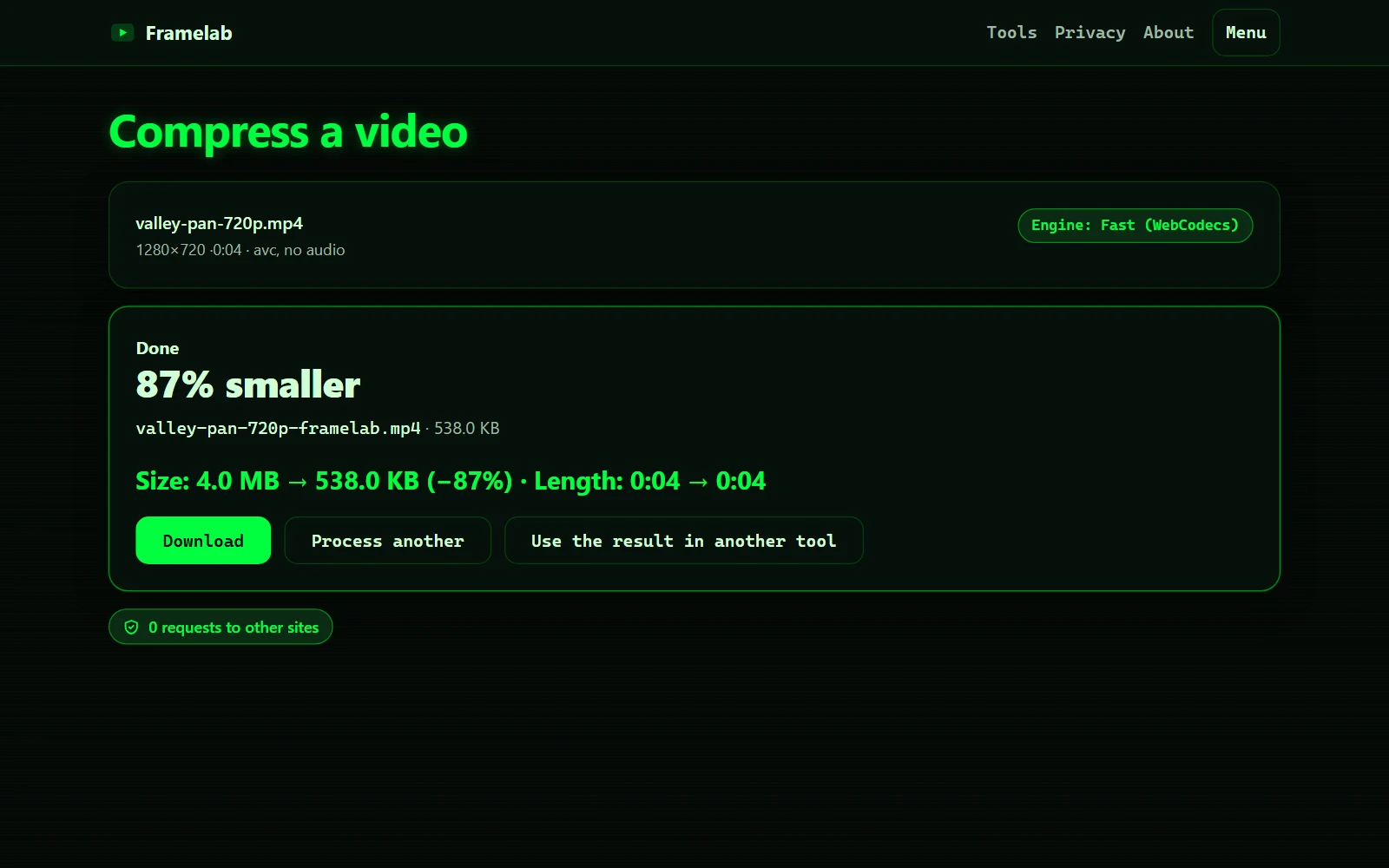
Compressed video done: 4.0 MB to 538 KB, 87% smaller
03 Get the result

A music player that lights up the lyrics word by word.

  • Word-by-word lyrics
  • Always-on-top overlay
  • Custom themes
Lyric overlay render time per frame
1.6 ms

6Built-in themes, plus your own

Get SyncPlay

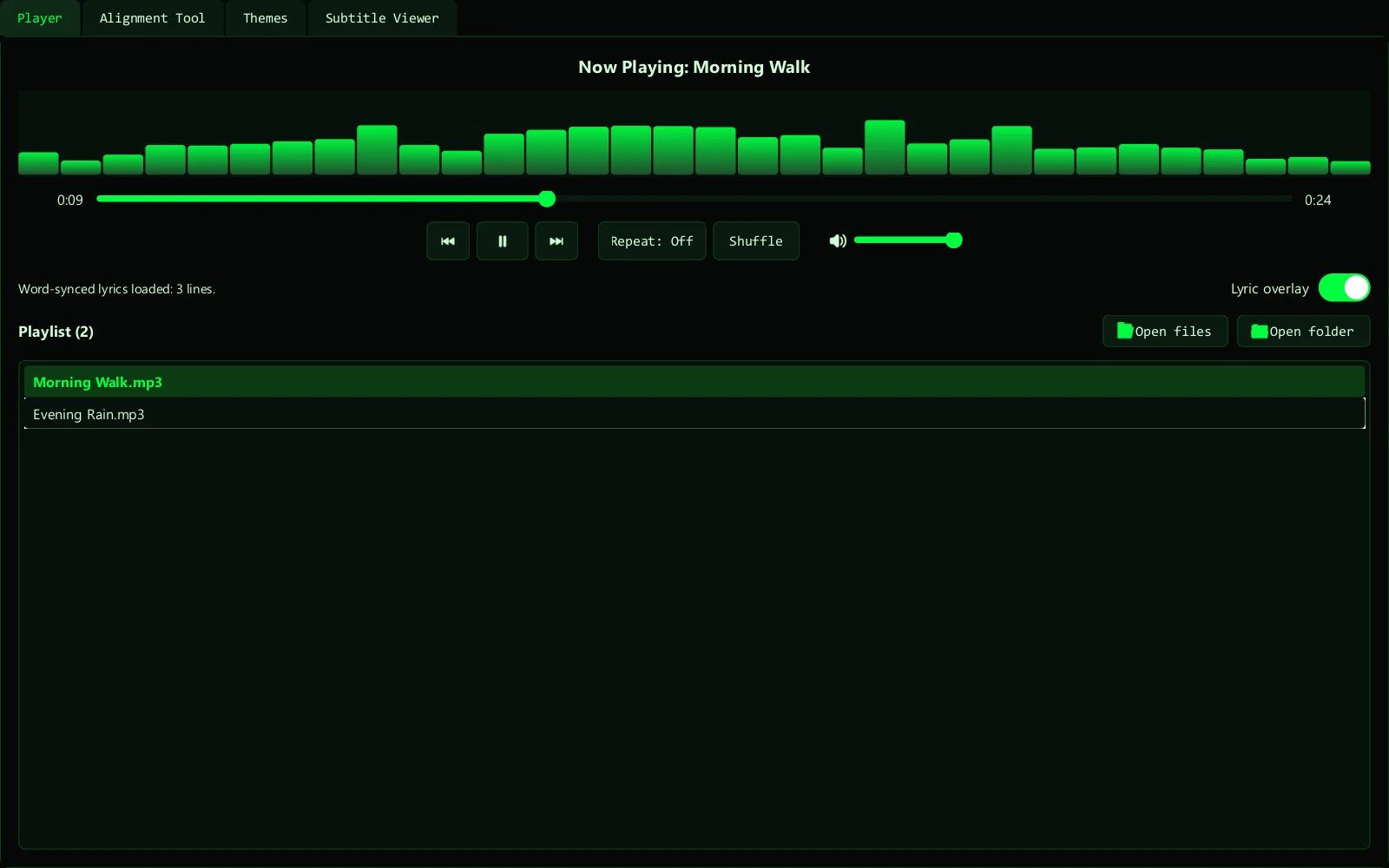
Desktop player playing Morning Walk with word-synced lyrics loaded
01 Play a track
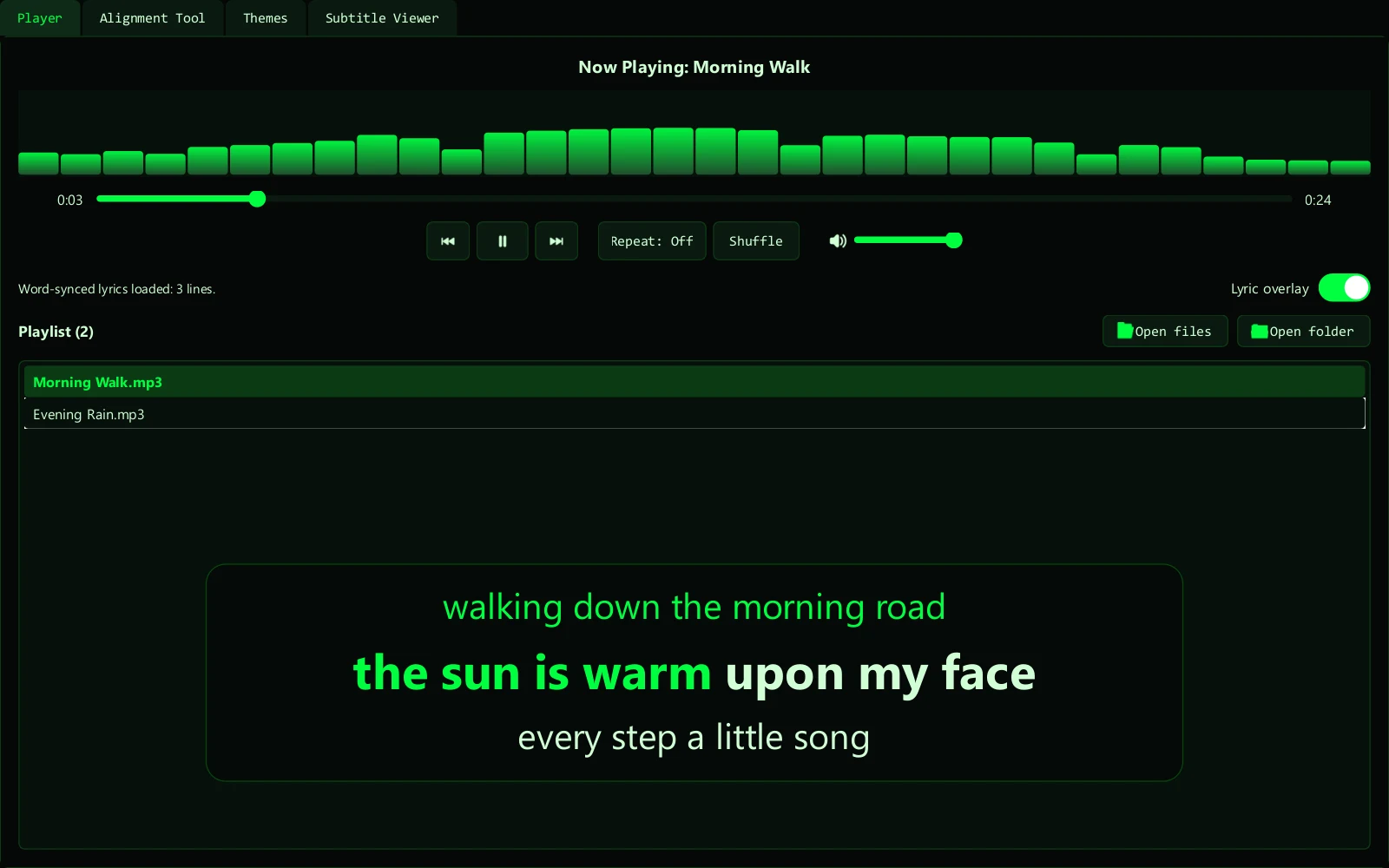
Lyric overlay highlighting the sung words of the current line
02 Follow the lyrics
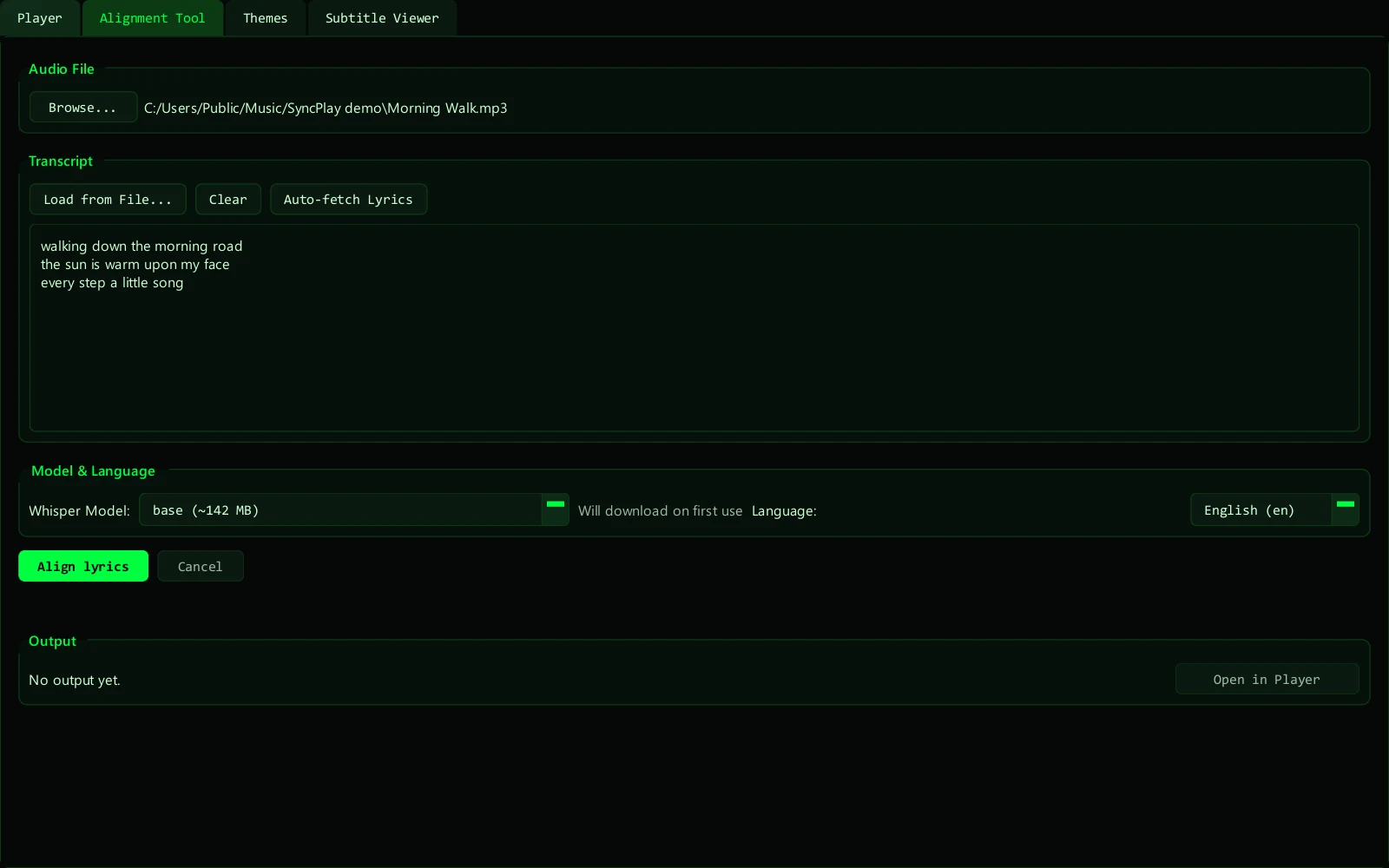
Alignment tool with the audio file and transcript ready to align
03 Align new lyrics

Product 01 of 05

Nopload

Edit images without uploading them.

A free, ad-free image suite where every byte is processed in your browser: remove backgrounds, compress, convert, resize, turn HEIC into JPG and strip EXIF.

Open NoploadSource code

Network activity panel showing 0 uploads and 0 third-party requests
How it is built
Nopload architecture: Astro page, Preact islands, Comlink Web Workers, jSquash codecs, libheif-js, onnxruntime-web (WebGPU or WASM), MODNet, U2-Net-P from /models/, Workbox service worker, CSP connect-src 'self'Astro page, PreactislandsComlink Web WorkersjSquash codecs,libheif-jsonnxruntime-web(WebGPU or WASM)MODNet, U2-Net-Pfrom /models/Workbox serviceworkerCSP connect-src'self'filesencoderemove backgroundpinned modelsofflineno other origin
  1. Astro page, Preact islands

    • filesComlink Web Workers
    • remove backgroundonnxruntime-web (WebGPU or WASM)
  2. Comlink Web Workers

    • encodejSquash codecs, libheif-js
  3. onnxruntime-web (WebGPU or WASM)

    • pinned modelsMODNet, U2-Net-P from /models/
  4. Workbox service worker

    • offlineAstro page, Preact islands
  5. CSP connect-src 'self'

    • no other originAstro page, Preact islands

Measured impact

Bytes uploaded while compressing a photo
0
How it was measured: Headless Chromium with the GPU off, timed from file in to result ready on the live site, with every request logged. 0 non-GET requests and 0 request-body bytes over 4 runs.
Compress a 12 MP photo
4.5 s
How it was measured: Headless Chromium with the GPU off, timed from file in to result ready on the live site, with every request logged. Median of 3 warm runs (3.4 to 4.6 s). The same job also ran with the network off.
Smaller offline install after the precache trim
about 27x
How it was measured: The old and new precache globs applied to the same build: 90 files and 11.67 MB down to 17 files and 0.43 MB.
Lighthouse performance, desktop
100
How it was measured: Lighthouse 13.6, median of 5 runs on the live home page, measured on 23 Nov 2026. 100 in all 5 runs, and 100 for accessibility, best practices and SEO.

What it does

Drop a photo and Nopload removes its background, shrinks it, converts it, resizes it or strips its location data, all inside your browser. Your image never leaves your device, and after the first visit it even works offline.

Who it helps Anyone who needs to edit a photo and would rather not hand it to an upload site, an account or a credit system.

Hard problems

  1. Prove that images are never uploaded, instead of asking to be trusted.

    Every page is served with a CSP of connect-src 'self', a header badge lists every request, and the e2e suite fails if any request leaves the site's origin on any page, during model load and inference, or offline.

  2. Remove backgrounds at full resolution with no server.

    MODNet and U2-Net-P, pinned in a models lock file, run through onnxruntime-web on WebGPU when available and on the CPU with WASM otherwise.

  3. Hand files from one tool to the next without leaving copies behind.

    An end-to-end test checks that files handed between tools are deleted from IndexedDB on pickup.

Trade-offs

  • No server means no upload, but the model and codecs ship to the browser and are cached for offline use.
  • WebGPU is used when available; the CPU WASM path is the fallback.

Design notes

  • Drop files anywhere on the home page and it asks what to do with them.
  • Every result offers a next step, for example "Next: compress it".
  • A "0 uploads" badge in the header opens a list of every request the page has made.
  • Light and dark themes, keyboard accessible, and audited on a 360 px phone.

Skills it proves

  • Astro 7
  • Preact
  • Tailwind CSS 4
  • onnxruntime-web
  • jSquash
  • libheif-js
  • exifr
  • fflate
  • Comlink
  • Workbox
  • Vitest
  • Playwright
  • Cloudflare Pages

Read the full write-up

Product 02 of 05

ForeverQR

QR codes that never expire.

A free QR code studio that makes codes that never expire, plus a checker that tells you whether someone else's code will. Everything runs in your browser.

Open ForeverQRSource code

Expiry checker reading the exported PNG: will not expire on its own
How it is built
ForeverQR architecture: Studio, Svelte 5 island, qrcode-generator, zxing-wasm decoder, pdf-lib, opentype.js export, Expiry checker, localStorage fqr:v1, @vite-pwa/astro offlineStudio, Svelte 5islandqrcode-generatorzxing-wasm decoderpdf-lib, opentype.jsexportExpiry checkerlocalStorage fqr:v1@vite-pwa/astroofflinedrawlive scan checkSVG, PNG, PDFdecodesettingsoffline
  1. Studio, Svelte 5 island

    • drawqrcode-generator
    • SVG, PNG, PDFpdf-lib, opentype.js export
    • settingslocalStorage fqr:v1
  2. qrcode-generator

    • live scan checkzxing-wasm decoder
  3. Expiry checker

    • decodezxing-wasm decoder
  4. @vite-pwa/astro offline

    • offlineStudio, Svelte 5 island

Measured impact

Third-party requests and cookies
0 and 0
How it was measured: Headless Chromium with the GPU off, timed from file in to result ready on the live site, with every request logged. Logged on the home page and while decoding.
Decode a QR, give its expiry verdict
about 250 ms
How it was measured: Headless Chromium with the GPU off, timed from file in to result ready on the live site, with every request logged. 253 ms median of 3 warm runs (238 to 321 ms).
Works offline
Yes
How it was measured: Network switched off and the tool reloaded: the verdict came back in 417 ms.
Lighthouse performance, desktop
100
How it was measured: Lighthouse 13.6, median of 5 runs on the live home page, measured on 23 Nov 2026. 100 for accessibility, best practices and SEO on every run.

What it does

Make a QR code for a link, a WiFi network, a contact card or an event, style it and download it. The codes are static, so they never expire. You can also check a code someone else made to see whether it might stop working.

Who it helps People who print a QR code on a menu, flyer or card and need it to keep working, and anyone wondering whether a code they were given will.

Hard problems

  1. Make codes that never expire.

    Only static codes are made, so a code never depends on a server that could expire.

  2. Prove a heavily styled code still scans.

    A live scan check decodes the code again with zxing-wasm to prove it reads.

  3. Tell whether someone else's code will expire.

    The expiry checker takes an uploaded, pasted or scanned code and classifies it as static, direct, dynamic or behind a shortener.

Trade-offs

  • Only static codes are made, so a code never depends on a server that could expire.
  • No back end means no analytics and no scan tracking.

Design notes

  • Colours, gradients, dot and eye styles, frames, logo upload and presets.
  • A live scan check reads the code back, so you know it works before you use it.
  • Export as SVG, PNG or PDF.
  • A footer meter shows the same request count you would see in DevTools.

Skills it proves

  • Astro
  • Svelte 5
  • Tailwind CSS 4
  • qrcode-generator
  • zxing-wasm
  • pdf-lib
  • opentype.js
  • @vite-pwa/astro

Read the full write-up

Product 03 of 05

QuietPDF

PDF tools where your files never leave your device.

Free PDF tools that run entirely in your browser: merge, split, compress, sign, redact, OCR and more, with nothing uploaded, no accounts, no ads and no analytics.

Open QuietPDFSource code

Merged PDF ready: 6 pages from 3 files, 437 KB
How it is built
QuietPDF architecture: Tool pages, pdf.js (self-hosted), qpdf (self-hosted), Tesseract OCR, OCR language data, same origin, Privacy meter, Service worker (PWA)Tool pagespdf.js (self-hosted)qpdf (self-hosted)Tesseract OCROCR language data,same originPrivacy meterService worker (PWA)OCRfirstusecounts requestsoffline
  1. Tool pages

    • connects topdf.js (self-hosted)
    • connects toqpdf (self-hosted)
    • OCRTesseract OCR
  2. Tesseract OCR

    • first useOCR language data, same origin
  3. Privacy meter

    • counts requestsTool pages
  4. Service worker (PWA)

    • offlineTool pages

Measured impact

Merge 10 PDFs, 2,000 pages
2.45 s
How it was measured: Headless Chromium with the GPU off, timed from file in to result ready on the live site, with every request logged. Median of 3 warm runs (2.34 to 2.59 s). The output was checked to have 2,000 pages.
Network requests after you drop the files
0
How it was measured: Headless Chromium with the GPU off, timed from file in to result ready on the live site, with every request logged. 0 requests of any kind over 4 merges.
Lighthouse performance, mobile and desktop
100
How it was measured: Lighthouse 13.6, median of 5 runs on the live home page, measured on 23 Nov 2026. 100 for accessibility, best practices and SEO on every run.
Home page weight
91 KB
How it was measured: Bytes transferred in 12 requests, from the Lighthouse network log.

What it does

Pick a PDF tool, add your file and get the result back, without anything being uploaded. There are no accounts, no ads, no analytics and no cookies, and after the first visit it works offline.

Who it helps Anyone who has to merge, sign, redact or OCR a PDF and would rather not upload it anywhere.

Hard problems

  1. Prove that files never leave the device.

    A strict CSP (connect-src 'self', script-src 'self') forbids requests to any other origin, and a meter on every page counts third-party requests and uploaded bytes live.

  2. Run heavy PDF and OCR engines without a CDN.

    pdf.js, qpdf, Tesseract and every font are self-hosted, and OCR fetches its language data from the site's own origin on first use.

  3. Catch an off-origin reference before it ships.

    A third-party check script scans the built site for any off-origin reference.

Trade-offs

  • Self-hosting every engine and font keeps the privacy proof simple, at the cost of shipping them with the site.
  • OCR language data is fetched on first use rather than bundled up front.

Design notes

  • A privacy meter at the bottom of every page counts third-party requests and uploaded bytes live.
  • One tool per job: merge, split, compress, sign, protect, unlock, true redaction and more.
  • OCR reads English and Hindi.

Skills it proves

  • pdf.js
  • qpdf
  • Tesseract
  • TypeScript
  • Service worker (PWA)
  • Vitest
  • Playwright

Read the full write-up

Product 04 of 05

Framelab

Video and audio tools that never upload your media.

Free video and audio tools that run entirely in your browser with WebCodecs: compress, convert, trim, resize, extract audio and add subtitles, with no upload and no watermark.

Open FramelabSource code

Compressed video done: 4.0 MB to 538 KB, 87% smaller
How it is built
Framelab architecture: Tool page, Svelte 5 island, Dedicated module worker, Mediabunny, WebCodecs, transformers.js, ONNX Runtime Web, Whisper model, own origin, IndexedDB hand-off, Hand-written service workerTool page, Svelte 5islandDedicated moduleworkerMediabunny,WebCodecstransformers.js,ONNX Runtime WebWhisper model, ownoriginIndexedDB hand-offHand-written serviceworkerfiledecode, edit, encodeauto subtitlesafter consentnext tooloffline
  1. Tool page, Svelte 5 island

    • fileDedicated module worker
    • auto subtitlestransformers.js, ONNX Runtime Web
    • next toolIndexedDB hand-off
  2. Dedicated module worker

    • decode, edit, encodeMediabunny, WebCodecs
  3. transformers.js, ONNX Runtime Web

    • after consentWhisper model, own origin
  4. Hand-written service worker

    • offlineTool page, Svelte 5 island

Measured impact

Smaller video from a 30 s 1080p clip
76%
How it was measured: A 40.9 MB H.264 clip on the Small preset, in headless Edge with the GPU off: 9.7 MB out, still 1080p and 30 s, checked with ffprobe.
Faster than real time
2.3x
How it was measured: The same 30 s clip compressed in 12.8 to 13.5 s over 3 runs, in the browser.
Lighthouse performance, mobile and desktop
100
How it was measured: Lighthouse 13.6, median of 5 runs on the live home page, measured on 23 Nov 2026. 100 for accessibility, best practices and SEO on every run.
Home page weight
22.7 KB
How it was measured: Bytes transferred in 9 requests, from the Lighthouse network log.

What it does

Open a tool, drop in a video or audio file and get the result back: compress it, trim it, turn it into a GIF, pull out the audio or add subtitles. Everything happens on your device, with no watermark and no limits.

Who it helps People who need to trim, shrink or subtitle a clip and do not want a watermark, a sign-up or an upload.

Hard problems

  1. Edit video with no upload endpoint at all.

    Every tool decodes, edits and encodes inside the page, in a dedicated module worker, with Mediabunny and WebCodecs.

  2. Speech models are large downloads.

    Auto subtitles downloads a Whisper model only after the user accepts its size; models come from Framelab's own origin and the offline cache never includes them.

  3. Codec support differs between browsers.

    Edge and Chrome use their H.264/AAC encoders for MP4, bundled Chromium offers WebM with a reason, and browsers without WebCodecs get a clear notice.

Trade-offs

  • Speech models download only after the user accepts their size, and the offline cache never includes them.
  • Browsers without WebCodecs get a clear notice instead of a degraded tool.
  • Bundled Chromium offers WebM with a reason, because MP4 needs the H.264/AAC encoders in Edge and Chrome.

Design notes

  • Each tool sits above the fold, with "Try a sample file" in every empty tool.
  • A before and after size and length summary follows each export.
  • "Use the result in another tool" moves the file between tools inside your browser.
  • A keyboard shortcuts sheet, light and dark themes, and a reduced-motion path.

Skills it proves

  • Astro 5
  • Svelte 5
  • TypeScript (strict)
  • Mediabunny
  • WebCodecs
  • transformers.js
  • ONNX Runtime Web
  • Vitest
  • Playwright
  • Cloudflare Pages

Read the full write-up

Product 05 of 05

SyncPlay

A music player with a word-by-word lyric overlay.

A Windows desktop music player with a transparent, word-level synchronized lyric overlay, theme customization and offline forced-alignment tools.

Get SyncPlaySource code

Alignment tool with the audio file and transcript ready to align
How it is built
SyncPlay architecture: QMediaPlayer engine, 30 Hz playback clock, QPainter lyric renderer, Transparent overlay (Win32), WLRC in MP3 ID3 tag, stable-ts alignment worker, Whisper model cacheQMediaPlayer engine30 Hz playback clockQPainter lyricrendererTransparent overlay(Win32)WLRC in MP3 ID3 tagstable-ts alignmentworkerWhisper model cachepositioncurrentwordword timingsdrawauto-embed
  1. QMediaPlayer engine

    • position30 Hz playback clock
  2. 30 Hz playback clock

    • current wordQPainter lyric renderer
  3. QPainter lyric renderer

    • drawTransparent overlay (Win32)
  4. WLRC in MP3 ID3 tag

    • word timingsQPainter lyric renderer
  5. stable-ts alignment worker

    • auto-embedWLRC in MP3 ID3 tag
  6. Whisper model cache

    • connects tostable-ts alignment worker

Measured impact

Lyric overlay render time per frame
1.6 ms
How it was measured: Median of 3,000 frames at 900 x 220 with word-level colouring: 4.8% of the 33 ms budget at 30 frames a second.
Automated tests passing
140 of 141
How it was measured: pytest in a clean environment. The one failure needs the ML aligner, which was not installed.
Embed and read lyrics in an MP3 tag
39 ms
How it was measured: Median round trip on a 3.7 MB MP3.

What it does

Play your own music and the lyrics float over your desktop, lighting up word by word as they are sung. If a song has no timed lyrics, SyncPlay can line the words up with the audio for you, offline, and save them inside the MP3.

Who it helps Windows listeners who want to sing along to their own music, word by word.

Hard problems

  1. Highlight the exact word being sung.

    Word-level timestamps live in .wlrc, a custom JSON format, looked up by binary search against a 30 Hz playback clock and drawn with QPainter.

  2. Get word timings without typing them by hand.

    An offline stable-ts (Whisper) forced-alignment worker, with optional CUDA, aligns the transcript to the audio and embeds the result into the MP3 (TXXX:WLRC) with mutagen.

  3. An overlay that stays on top without getting in the way.

    A transparent, always-on-top window that is click-through by default; holding for 300 ms enters drag mode, and a grip resizes it.

Trade-offs

  • Windows 10/11 only, in exchange for Win32 overlay behaviours such as click-through.
  • The audio visualizer animates decorative bars and is not driven by the audio spectrum yet.

Design notes

  • The overlay sizes itself to the longest line and fades out after 5 seconds of pause.
  • 6 built-in themes plus custom themes, with a live preview on the overlay.
  • Keyboard shortcuts for play, open file, the overlay and settings.
  • Minimizes to the system tray, with playback controls in the tray menu.

Skills it proves

  • Python 3.11+
  • PyQt
  • QMediaPlayer
  • mutagen
  • stable-ts
  • pytest
  • PyInstaller

Read the full write-up

Skills

Skills and the products that prove them
SkillWhere it shipsProducts
Machine learning in the browser
  • Nopload
  • QuietPDF
  • Framelab
3
WebAssembly and media codecs
  • Nopload
  • ForeverQR
  • QuietPDF
  • Framelab
4
Offline-first web apps
  • Nopload
  • ForeverQR
  • QuietPDF
3
PDF and document processing
  • ForeverQR
  • QuietPDF
2
Astro, Svelte and Preact front ends
  • Nopload
  • ForeverQR
  • Framelab
3
End-to-end and unit testing
  • Nopload
  • QuietPDF
  • Framelab
  • SyncPlay
4
Python desktop apps
  • SyncPlay
1
Stack by layer
LayerToolsCount
Languages
  • TypeScript
  • JavaScript
  • Python
  • SQL
4
Frontend
  • React
  • Next.js
  • Tailwind CSS
  • Motion
4
Backend
  • Node.js
  • Bun
  • REST
  • GraphQL
4
Tooling
  • Git
  • GitHub Actions
  • Vitest
  • Playwright
4

What I make for people

  • Tools you can open and use straight away

    You land on the page and the tool is there, ready for your file.

  • Pages that respond quickly

    I care about performance, so nobody waits around to get started.

  • Built for everyone

    I care about accessibility: keyboard, screen readers and small screens included.

I build fast, accessible web apps and the tooling around them. Live right now: Nopload, ForeverQR, QuietPDF, Framelab, SyncPlay.

Contact

Status
Open to interesting problems and good teams; email is fastest.

Got something people should enjoy using?

I am open to interesting problems and good teams. Email is the fastest way to reach me.

Say helloGitHubLinkedIn